- Search Results
This is the Resurrection Remix Nougat ROM for Galaxy NOTE 2. We also have the Lineage OS 14.1 for Galaxy NOTE 2, CM14.1 for Galaxy NOTE 2. This Nougat Resurrection Remix ROM for Galaxy NOTE 2 is brought to you by developer hibin.m.
DONATION TO DEVELOPER:
If you like this RR Nougat ROM for Galaxy NOTE 2, then consider a donation to hibin.m, the developer of this ROM.
DISCLAIMER:
Installing a custom ROM on a the Galaxy NOTE 2 may require the bootloader to be unlocked on Galaxy NOTE 2 and a Custom Recovery on Galaxy NOTE 2, which may VOID your warranty and may delete all your data. Before proceeding further you may consider backup all data on the phone. You are the only person doing changes to your phone and I cannot be held responsible for the mistakes done by you.Status of Galaxy NOTE 2 Resurrection Remix Nougat ROM (RR Nougat ROM):
WHAT’S WORKING:
– Not KnownKNOWN ISSUES:
– Not Known
REQUIRED DOWNLOADS AND LINKS FOR GALAXY NOTE 2 RESURRECTION REMIX NOUGAT CUSTOM ROM UPDATE GUIDE:
- TWRP download link for Galaxy NOTE 2 (n7100)
– Here is: Custom Recovery Installation Guide for Galaxy NOTE 2 (This guide is only for .tar or .tar.md5 TWRP file)
– To flash .img file you can follow this TWRP update guide using fastboot or you can use Flashify to update the .img TWRP. [YOUR DEVICE MIGHT NEED TO BE BOOTLOADER UNLOCKED IF YOU ARE FOLLOWING THIS] - ROM download link of RR Nougat for Galaxy NOTE 2
- RR Nougat GApps download link for Galaxy NOTE 2 Resurrection Remix Nougat ROM
Root binary is inbuilt since CyanogenMod 12. As the Resurrection Remix ROM is based on CyanogenMod ROM, so you don’t need a separate SuperSu package to install to gain ROOT access. Here is How to Enable ROOT on RR Nougat ROMHOW TO INSTALL/FLASH/UPDATE RR NOUGAT ON GALAXY NOTE 2 (RESURRECTION REMIX NOUGAT ROM):
Points to NOTE on BACKUP:
– Try to avoid restoring apps backup using Titanium Backup. It may break things up.
– Don’t restore system data using Titanium Backup! It will definitely break the current installation.
– It is also discouraged to Restoring Apps + Data using Titanium Backup.Follow these steps if you are flashing Resurrection Remix Nougat on Galaxy NOTE 2 for the first time, or coming from another ROM:
- Download and Copy the Nougat GApps, Resurrection Remix Nougat ROM and the CM setup remover ZIP to Galaxy NOTE 2.
- Boot into Recovery. Make sure to have a Custom recovery like CWM or TWRP or any other custom recovery.
- Wipe data factory reset, Cache partition, Dalvik Cache and Format the System partition.
– Here is a guide explaining how to wipe data using TWRP recovery.This will delete all your data on your phone. You may consider complete backup of your phone data or take a NANDROID backup of the current ROM.
– How to backup all data on your Android Device.
– how to take NANDROID backup using TWRP recovery. - First flash the Galaxy NOTE 2 RR Nougat ROM ZIP from device.
– Here is a post explaining how to flash a custom ROM using TWRP recovery. - Then reboot into recovery (don’t skip this) and flash the RR Nougat Google Apps package.
– Here is a post explaining how to flash GApps using TWRP recovery. - Reboot and Enjoy the Resurrection Remix Nougat ROM on Galaxy NOTE 2.
Upgrading from earlier version of Galaxy NOTE 2 Resurrection Remix Nougat ROM:
- Copy the Resurrection Remix Nougat ROM ZIP file to your phone.
- Boot into Recovery.
- Flash the latest Resurrection Remix Nougat ROM ZIP from your phone.
– Here is a post explaining how to flash a custom ROM using TWRP recovery. - Then flash the Resurrection Remix Nougat Google Apps package.
– Here is a post explaining how to flash GApps using TWRP recovery. - Reboot and Enjoy
Complete the initial setup and enjoy Android Nougat 7.0.0_r1 with Resurrection Remix Nougat On Galaxy NOTE 2 (codename: n7100). After this Resurrection Remix Nougat ROM installation you may want to enable ROOT access on your phone and here is how you can do that:
How to Enable ROOT on RR Nougat ROM.If you are looking for some more Android Nougat ROMs for the same device or other device, then we also have update a big list of Lineage OS 14.1 ROM, many Android NOUGAT AOSP ROMs, many UNOFFICIAL CyanogenMod 14 ROMs, OFFICIAL CM14.1 ROMs and Resurrection Remix Nougat ROMs.
Stay tuned or Subscribe to the Galaxy NOTE 2 (n7100) forum For other Android Nougat ROMs, Lineage OS ROMs, CyanogenMod ROMs, Resurrection Remix ROMs, other Custom ROMs and all other device specific topics.Android Oreo 8.0 ROM, LineageOS 15 for Galaxy J5 has now arrived via an UNOFFICIAL build. This LineageOS 15 supports the following Galaxy J5 variants: J500FN, J500F/G/M/Y. This LineageOS 15 for Galaxy J5 (j5lte) is brought to you by developer Dyneteve.
DONATION TO DEVELOPER:
– No donation link found for Dyneteve.
If you want the OFFICIAL LineageOS update or some more Android Oreo ROMs then stay tuned to the LineageOS 15 ROMs page or the AOSP Android Oreo devices list page or the AICP 13 Oreo ROMs list.
DISCLAIMER:
THIS IS A BETA ROM AND MAY HAVE MANY BUGS. HAVE A BACKUP BEFORE FLASHING THIS LINEAGEOS ROM AND TRY AT YOUR OWN RISK. Installing a custom ROM on a Galaxy J5 (j5lte) requires the bootloader to be unlocked on the Galaxy J5 (j5lte) phone, which may VOID your warranty and may delete all your data. Before proceeding further you may consider backup all data on the phone. You are the only person doing changes to your phone and I cannot be held responsible for the mistakes done by you.Content structure:
Status of LineageOS 15 for Galaxy J5 Oreo ROM:
WHAT’S WORKING:
– UnknownKNOWN ISSUES:
– Unknown
REQUIRED LINKS AND FILES FOR LineageOS 15 for Galaxy J5 OREO CUSTOM ROM:
- TWRP recovery link for Galaxy J5 (j5lte) [You need the TWRP 3.2.1]
– Here is theTWRP update guide for the Galaxy J5 (j5lte).
- LineageOS 15 Download link for Galaxy J5 J500H
- LineageOS 15 Download link for Galaxy J5 J500FN
- LineageOS 15 Download link for Galaxy J5 J500F/G/M/Y
- LineageOS 15 GApps download link for LineageOS 15 for Galaxy J5 Oreo 8.0 ROM
Root binary is NOT inbuilt in LineageOS 15, so you may need a separate SuperSu package or LineageOS su binary to install to gain ROOT access. Here is LineageOS Rooting guide
If there is no in-built ROOT or it does not work for some reason then you can try SuperSU rooting guide to enable ROOT access.HOW TO INSTALL/DOWNLOAD/FLASH/UPDATE LineageOS 15 FOR Galaxy J5 OREO CUSTOM ROM:
Follow this if you are flashing LineageOS 15 for Galaxy J5 for the first time, or coming from another ROM:
Points to NOTE:
– Try to avoid restoring apps backup using Titanium Backup. It may break things up.
– Don’t restore system data using Titanium Backup! It will definitely break the current installation.
– It is also discouraged to Restoring Apps + Data using Titanium Backup.- Boot into Recovery. Make sure to have a Custom recovery like CWM or TWRP or any other custom recovery. If not then follow the Custom Recovery Installation Guide for Galaxy J5 (it’s a generic guide which will work for TWRP as well as CWM recovery or any other recovery)
- Wipe data factory reset, Cache partition, Dalvik Cache and Format the System partition.
– Here is a guide explaining how to wipe data using TWRP recovery.This will delete all your data on your phone. You may consider complete backup of your phone data or take a NANDROID backup of the current ROM
– How to backup all data on your Android Device
– how to take NANDROID backup using TWRP recovery - Download and Copy the LineageOS 15 GApps and the Android Oreo based LineageOS 15 for Galaxy J5 ROM ZIP file to your phone.
- First flash the LineageOS 15 for Galaxy J5 Oreo ROM ZIP from device. Then flash the GApps for LineageOS 15 zip from your device memory.
– Here is a post explaining how to install LineageOS - Then reboot into recovery (don’t skip this) and flash the Gapps for LineageOS 15 package.
– Here is a post explaining how to flash GApps using TWRP recovery. - Reboot and Enjoy the Oreo 8.0 LineageOS 15 ROM for Galaxy J5.
Upgrading from earlier version of LineageOS 15 for Galaxy J5 (j5lte):
- Copy the latest Galaxy J5 Lineage 15 Oreo ROM ZIP file to your phone.
- Boot into Recovery.
- Flash the latest LinegeOS ROM ZIP from your phone.
– Here is a post explaining how to install LineageOS - Then flash the Lineage 15 Oreo GApps package.
– Here is a post explaining how to flash GApps using TWRP recovery. - Reboot and Enjoy
Complete the initial setup and enjoy Android Oreo 8.0 with LineageOS 15 for Galaxy J5. After the installation of LineageOS 15 for Galaxy J5 you may want to enable ROOT access on your phone and here is how you can do that:
How to Enable ROOT on LineageOS 15.Stay tuned or Subscribe to the Galaxy J5 LineageOS forum For other Android Oreo, Nougat ROMs, LineageOS 15 ROMs, other ROMs and all other device specific topics.If you have found any issues on this ROM then here is the dev link where you can place your concerns.
Android Oreo 8.1 ROM, LineageOS 15.1 for Galaxy Grand Prime has now arrived via an UNOFFICIAL build. This LineageOS 15.1 for Galaxy Grand Prime (fortuna3g) is brought to you by developer CarlosArriagaCM, one build is by Boulaxx and another build is by Has.007.
DONATION TO DEVELOPER:
– No donation link found for Boulaxx and Has.007.
– If you like this ROM then do consider a contribution to CarlosArriagaCM for his efforts:
Donate to CarlosArriagaCMIf you want the OFFICIAL LineageOS update or some more Android Oreo ROMs then stay tuned to the LineageOS 15 page or the AOSP Android Oreo devices list page.
DISCLAIMER:
THIS IS AN INITIAL ALPHA ROM AND MAY HAVE MANY BUGS. HAVE A BACKUP BEFORE FLASHING THIS LINEAGEOS ROM AND TRY AT YOUR OWN RISK. Installing a custom ROM on a Galaxy Grand Prime (fortuna3g) requires the bootloader to be unlocked on the Galaxy Grand Prime (fortuna3g) phone, which may VOID your warranty and may delete all your data. Before proceeding further you may consider backup all data on the phone. You are the only person doing changes to your phone and I cannot be held responsible for the mistakes done by you.Status of LineageOS 15.1 for Galaxy Grand Prime Oreo ROM:
WHAT’S WORKING:
– Audio
– BluetoothKNOWN ISSUES:
– Wifi
– Camera
REQUIRED LINKS AND FILES FOR LineageOS 15.1 for Galaxy Grand Prime OREO CUSTOM ROM:
- TWRP recovery link for Galaxy Grand Prime (fortuna3g)- Here is theTWRP update guide for the Galaxy Grand Prime (fortuna3g).
- LineageOS 15.1 Download link for Galaxy Grand Prime by Has.007
– Bootable patch for Has.007’s build - LineageOS 15.1 Download link for Galaxy Grand Prime by CarlosArriagaCM
- LineageOS 15.1 Download link for Galaxy Grand Prime by Boulaxx [UPDATED on 26th NOVEMBER]
- LineageOS 15.1 GApps download link for LineageOS 15.1 for Galaxy Grand Prime Oreo 8.1 ROM (Download the stock ARM64 GApps)
Root binary is NOT inbuilt in LineageOS 15.1, so you may need a separate SuperSu package or LineageOS su binary to install to gain ROOT access. Here is LineageOS Rooting guide
If there is no in-built ROOT or it does not work for some reason then you can try SuperSU rooting guide to enable ROOT access.HOW TO INSTALL/DOWNLOAD/FLASH/UPDATE LineageOS 15.1 FOR Galaxy Grand Prime OREO CUSTOM ROM:
Follow this if you are flashing LineageOS 15.1 for Galaxy Grand Prime for the first time, or coming from another ROM:
Points to NOTE:
– Try to avoid restoring apps backup using Titanium Backup. It may break things up.
– Don’t restore system data using Titanium Backup! It will definitely break the current installation.
– It is also discouraged to Restoring Apps + Data using Titanium Backup.- Boot into Recovery. Make sure to have a Custom recovery like CWM or TWRP or any other custom recovery. If not then follow the Custom Recovery Installation Guide for Galaxy Grand Prime (it’s a generic guide which will work for TWRP as well as CWM recovery or any other recovery)
- Wipe data factory reset, Cache partition, Dalvik Cache and Format the System partition.
– Here is a guide explaining how to wipe data using TWRP recovery.This will delete all your data on your phone. You may consider complete backup of your phone data or take a NANDROID backup of the current ROM
– How to backup all data on your Android Device
– how to take NANDROID backup using TWRP recovery - Download and Copy the LineageOS 15.1 GApps and LineageOS 15.1 for Galaxy Grand Prime ROM ZIP file to your phone.
- First flash the LineageOS 15.1 for Galaxy Grand Prime ROM ZIP from device. Then flash the GApps for LineageOS 15.1 zip from your device memory.
– Here is a post explaining how to install LineageOS - Then reboot into recovery (don’t skip this) and flash the Gapps for LineageOS 15.1 package.
– Here is a post explaining how to flash GApps using TWRP recovery. - Reboot and Enjoy the Oreo 8.1 LineageOS 15.1 ROM for Galaxy Grand Prime.
Upgrading from earlier version of LineageOS 15.1 for Galaxy Grand Prime (fortuna3g):
- Copy the latest Galaxy Grand Prime Lineage 15 ROM ZIP file to your phone.
- Boot into Recovery.
- Flash the latest LinegeOS ROM ZIP from your phone.
– Here is a post explaining how to install LineageOS - Then flash the Lineage 15 Oreo GApps package.
– Here is a post explaining how to flash GApps using TWRP recovery. - Reboot and Enjoy
Complete the initial setup and enjoy Android Oreo 8.1 with LineageOS 15.1 for Galaxy Grand Prime. After the installation of LineageOS 15.1 for Galaxy Grand Prime you may want to enable ROOT access on your phone and here is how you can do that:
How to Enable ROOT on LineageOS 15.1.Stay tuned or Subscribe to the Galaxy Grand Prime LineageOS forum For other Android Oreo, Nougat ROMs, LineageOS 15.1 ROMs, other ROMs and all other device specific topics.If you have found any BUG or any issues with this ROM, then following is the development thread on XDA for Has.007’s build.
The good news is that LineageOS 16 for Galaxy S6 is now available to download and install. This build of LineageOS 16 for Galaxy S6 is brought to you by developer enesuzun2002.
DONATION TO DEVELOPER(S)/PROJECT:
If you like this ROM then do consider for a contribution to enesuzun2002 and LineageOS project:
– Donate to enesuzun2002
– Donate to LineageOS project[su_note note_color=”#D7E3F4″ text_color=”#728095″ radius=”3″ class=”” id=””]
Searching where to download LineageOS 16 for Galaxy S6?
Wondering how to install LineageOS 16 on Galaxy S6?
If you have one of the question for your Galaxy S6, then you are at the right place and here is where to download and how to install LineageOS 16 on Galaxy S6, with a step-by-step guide.
[/su_note]Follow the links to get other LineageOS 16 and Android Pie ROM builds.

[su_note note_color=”#F9D9D9″ text_color=”#AA4343″ radius=”3″ class=”” id=””]DISCLAIMER:
THIS IS AN INITIAL BUILD OF Galaxy S6 LineageOS 16 WHICH MAY NOT BOOT AT ALL OR EVEN IF IT BOOTS, IT MAY HAVE MANY BUGS.
MAKE SURE TO BACKUP THE CURRENT ROM AND ALL DATA OF YOUR PHONE BEFORE INSTALLING.[/su_note][su_note note_color=”#FBF4DD” text_color=”#A38C68″ radius=”3″ class=”” id=””]Installing a TWRP recovery on Galaxy S6 may delete all your data. Before proceeding further you may consider backup all data on the phone.
You are the only person doing changes to your phone; neither the developer nor I can be held responsible for the mistakes done by you.[/su_note]
Status of Galaxy S6 LineageOS 16:
WHAT’S WORKING:
– EverythingKNOWN ISSUES:
– IMS services
– HWC
– Samsung features such as: KNOX, Samsung Pay etc.REQUIRED GUIDES AND DOWNLOADS TO INSTALL Galaxy S6 LineageOS 16 ANDROID 9 PIE ROM:
[styledlist style=”yes”]- Download TWRP for Galaxy S6 (zeroflte) to install LineageOS 16
- Install TWRP recovery using ODIN
- ROM Download link of Galaxy S6 LineageOS 16
- Download MindTheGApps for LineageOS 16
- How to Root LineageOS 16
/ Download GApps for LineageOS 16
[/styledlist]
HOW TO UPDATE/INSTALL LineageOS 16 FOR Galaxy S6 – Android 9 Pie CUSTOM ROM:
[su_note note_color=”#D7E3F4″ text_color=”#728095″ radius=”3″ class=”” id=””]
Following are the two sub-sections of this LineageOS 16 guide:- Fresh installation of Galaxy S6 LineageOS 16
- Updating a new Galaxy S6 LineageOS 16 on top of previous LineageOS 16[/su_note]
How to Install LineageOS 16 on Galaxy S6 for the first time:
[su_note note_color=”#FBF4DD” text_color=”#A38C68″ radius=”3″ class=”” id=””]
Points to NOTE:- Try to avoid restoring apps backup using Titanium Backup. It may break things up.
- Don’t restore system data using Titanium Backup! It will definitely break the current installation.
- It is also discouraged to Restoring Apps + Data using Titanium Backup.
[/su_note]
- Download and Copy the LineageOS 16 Gapps and the Galaxy S6 LineageOS 16 ROM ZIP file to your phone.
- Boot into the TWRP custom Recovery to install this LineageOS 16 for Galaxy S6.
[su_note note_color=”#D7E3F4″ text_color=”#728095″ radius=”3″ class=”” id=””]- Make sure to have a Custom recovery like a TWRP recovery or any other custom recovery.
– If not then download the TWRP recovery from Downloads link and follow how to install TWRP on Samsung using ODIN (it’s a generic guide which will work for TWRP as well as any other recovery)[/su_note] - Wipe the data partition (or do a factory reset), Cache partition, Dalvik Cache or ART cache and Format the System partition.
[su_note note_color=”#D7E3F4″ text_color=”#728095″ radius=”3″ class=”” id=””]- Here is a guide explaining how to wipe using TWRP recovery.[/su_note]
[su_note note_color=”#FBF4DD” text_color=”#A38C68″ radius=”3″ class=”” id=””]This will delete all your data on your phone. You may consider complete backup of your phone data or take a NANDROID backup of the current ROM
– How to backup all data on your Android Device
– how to take NANDROID backup using TWRP recovery[/su_note] - Install the Galaxy S6 LineageOS 16 ROM file that you have copied into the phone.
[su_note note_color=”#D7E3F4″ text_color=”#728095″ radius=”3″ class=”” id=””]- Here is a post explaining how to install LineageOS[/su_note] - Then install the Android Pie MindTheGapps for LineageOS 16 package.
[su_note note_color=”#D7E3F4″ text_color=”#728095″ radius=”3″ class=”” id=””]- Here is a post explaining how to install GApps using TWRP recovery.[/su_note] - Reboot and Enjoy the Galaxy S6 LineageOS 16 Android 9 Pie ROM.
Upgrading a new version of LineageOS 16 for Galaxy S6 (zeroflte):
- Copy the latest ROM zip file of LineageOS 16 for Galaxy S6, LineageOS 16 GApps and/or Magisk ROOT package to the phone
- Boot into Recovery.
– Make sure you have a latest custom Recovery that should be able to install the LineageOS 16 update. - Format or wipe the system partition from the custom recovery menu.
- Install the LineageOS 16 on Galaxy S6.
[su_note note_color=”#D7E3F4″ text_color=”#728095″ radius=”3″ class=”” id=””]- Here is a post explaining how to install LineageOS[/su_note] - Reboot and see you have the GApps and ROOT access or NOT.- Gapps is built in such a way that it will sustain across ROM updates.
- If you don’t have GApps after upgrading the LineageOS 16 on Galaxy S6, then install the GApps.
[su_note note_color=”#D7E3F4″ text_color=”#728095″ radius=”3″ class=”” id=””]- Here is a post explaining how to install GApps using TWRP recovery.[/su_note] - If you don’t have ROOT after upgrading the LineageOS 16 on Galaxy S6, then install the SuperSU or Magisk or the Lineage SU binary.
[su_note note_color=”#D7E3F4″ text_color=”#728095″ radius=”3″ class=”” id=””]- Here is a post explaining How to Enable ROOT on LineageOS 16[/su_note] - Once everything is done, reboot and Enjoy the LineageOS 16 for Galaxy S6.
[su_note note_color=”#D8F1C6″ text_color=”#769958″ radius=”3″ class=”” id=””]Complete the initial setup and enjoy Android 9 Pie with LineageOS 16 on Galaxy S6.[/su_note]
After installing LineageOS 16 on Galaxy S6 you may want to install Google Camera (GCam) or enable ROOT access on your phone and here is how you can do that:
– LineageOS 16 ROOT
– Google Camera APK for Android Pie (this page contains a huge list of GCam for all available devices)[su_note note_color=”#D7E3F4″ text_color=”#728095″ radius=”3″ class=”” id=””]If there is no ROOT access for some reason even after installing the LineageOS SU binary, then you can try SuperSU rooting guide to enable ROOT access.[/su_note]
Stay tuned or Subscribe to the Galaxy S6 (zeroflte) LineageOS forum For other Android Pie, Android Oreo ROMs, Nougat ROMs, or other ROMs and all other device specific topics.Android Nougat 7.1 ROM, LineageOS 14.1 for Galaxy Express has now arrived via an UNOFFICIAL build. If you want some more LineageOS ROMs or wanna taste the OFFICIAL LineageOS build then stay tuned to the LineageOS 14.1 ROM Devices list page. This Galaxy Express LineageOS 14.1 is brought to you by developer kotzir.
DONATION TO DEVELOPER:
If you like this LineageOS 14.1 ROM for Express, then do consider a donation to kotzir.
DISCLAIMER:
THIS IS AN INITIAL BUILD WHICH MAY HAVE MANY MORE BUGS THAN YOU CAN IMAGINE. HAVE A BACKUP BEFORE FLASHING THIS AND TRY AT YOUR OWN RISK. Installing a custom ROM on a Galaxy Express (expressltexx, GT-i8730) may require the bootloader to be unlocked, which may VOID your warranty and may delete all your data. Before proceeding further you may consider backup all data on the phone. You are the only person doing changes to your phone and I cannot be held responsible for the mistakes done by you.Status of LineageOS 14.1 for Galaxy Express (expressltexx, GT-i8730) Nougat 7.1 ROM:
WHAT’S WORKING:
– Not KnownKNOWN ISSUES:
– Not Known
REQUIRED LINKS AND FILES FOR LineageOS 14.1 for Galaxy Express NOUGAT 7.1 BASED CUSTOM ROM:
- Latest stock FW and baseband
- TWRP recovery for Express (i8730/T, expressltexx)
– Here is: Custom Recovery Installation Guide for Samsung Galaxy Express (This guide is only for .tar or .tar.md5 TWRP file)
– To flash .img file you can follow this TWRP update guide using fastboot or you can use Flashify to update the .img TWRP. [YOUR DEVICE MIGHT NEED TO BE BOOTLOADER UNLOCKED IF YOU ARE FOLLOWING THIS] - ROM Download Link of Galaxy Express LineageOS 14.1 ROM (expressltexx, GT-i8730)
- LineageOS 14.1 GApps download link for Galaxy Express LineageOS 14.1 Nougat 7.1 ROM
Root binary is NOT inbuilt in LineageOS 14.1, so you may need a separate SuperSu package or LineageOS su binary to install to gain ROOT access. Here is How to Enable ROOT on LineageOS 14.1
If there is no in-built ROOT or it does not work for some reason then you can try flashing SuperSU zip using recovery to gain ROOT access.HOW TO INSTALL/DOWNLOAD/FLASH/UPDATE Galaxy Express LineageOS 14.1 NOUGAT CUSTOM ROM:
Follow this if you are flashing LineageOS 14.1 for Galaxy Express (expressltexx, GT-i8730) for the first time, or coming from another ROM:
Points to NOTE:
– Try to avoid restoring apps backup using Titanium Backup. It may break things up.
– Don’t restore system data using Titanium Backup! It will definitely break the current installation.
– It is also discouraged to Restoring Apps + Data using Titanium Backup.- Download and Copy the GApps and LineageOS 14.1 for Galaxy Express ROM ZIP to your phone.
- Boot into Recovery. Make sure to have a Custom recovery like CWM or TWRP or any other custom recovery. If not then follow the Custom Recovery Installation Guide for Galaxy Express (expressltexx, GT-i8730) (it’s a generic guide which will work for TWRP as well as CWM recovery or any other recovery)
- Wipe data factory reset, Cache partition, Dalvik Cache and Format the System partition.
– Here is a guide explaining how to wipe data using TWRP recovery.This will delete all your data on your phone. You may consider complete backup of your phone data or take a NANDROID backup of the current ROM
– How to backup all data on your Android Device
– how to take NANDROID backup using TWRP recovery - First flash the Galaxy Express LineageOS 14.1 ROM ZIP from device. Then flash the GApps zip from your device memory.
– Here is a post explaining how to install LineageOS. - DO NOT REBOOT yet. Then flash the LineageOS 14.1 GApps package.
– Here is a post explaining how to flash LineageOS 14.1 GApps using TWRP recovery. - Reboot and Enjoy the Nougat 7.1 LineageOS 14.1 ROM for Galaxy Express (expressltexx, GT-i8730).
Upgrading from earlier version of Galaxy Express LineageOS 14.1 (expressltexx, GT-i8730):
- Copy the latest LineageOS 14.1 for Galaxy Express ROM ZIP file to your phone.
- Boot into Recovery.
- Flash the latest LineageOS ROM ZIP from your phone.
– Here is a post explaining how to install LineageOS. - Then flash the LineageOS 14.1 Nougat GApps package.
– Here is a post explaining how to flash GApps using TWRP recovery. - Reboot and Enjoy
Complete the initial setup and enjoy Android Nougat 7.1 with LineageOS 14.1 for Galaxy Express (expressltexx, GT-i8730). After the installation of Galaxy Express LineageOS 14.1 ROM (expressltexx, GT-i8730) you may want to enable ROOT access on your phone and here is how you can do that:
How to Enable ROOT on LineageOS 14.1.Stay tuned or Subscribe to the Galaxy Express (expressltexx, GT-i8730) forum For other Android Nougat ROMs, LineageOS 14.1 ROMs, other ROMs and all other device specific topics.Android Oreo 8.0 ROM, LineageOS 15.1 for Galaxy Core Prime has now arrived via an UNOFFICIAL build. This LineageOS 15.1 for Galaxy Core Prime (core33g) is brought to you by developer Nikit.
DONATION TO DEVELOPER:
If you like this ROM then do consider a contribution to Nikit for his efforts:
Donate to NikitIf you want the OFFICIAL LineageOS update or some more Android Oreo ROMs then stay tuned to the LineageOS 15.1 page or the AOSP Android Oreo devices list page.
DISCLAIMER:
THIS IS A BETA ROM AND MAY HAVE MANY BUGS. HAVE A BACKUP BEFORE FLASHING THIS LINEAGEOS ROM AND TRY AT YOUR OWN RISK. Installing a custom ROM on a Galaxy Core Prime (core33g) requires the bootloader to be unlocked on the Galaxy Core Prime (core33g) phone, which may VOID your warranty and may delete all your data. Before proceeding further you may consider backup all data on the phone. You are the only person doing changes to your phone and I cannot be held responsible for the mistakes done by you.Status of LineageOS 15.1 for Galaxy Core Prime Oreo ROM:
WHAT’S WORKING:
– Wifi
– Audio (Stereo Playback is a little buggy) (should be fixed)
– USB Tethering
– Storage ( Both internal and external )
– GPS
– BluetoothKNOWN ISSUES:
– RIL ( Completely broken )
– Video Playback (hardware acceleration)
– Camera
– Sensors
– Maybe more ROM specific bugs
REQUIRED LINKS AND FILES FOR LineageOS 15.1 for Galaxy Core Prime OREO CUSTOM ROM:
- TWRP recovery link for Galaxy Core Prime (core33g) [Use This TWRP ONLY]- Here is theTWRP update guide for the Galaxy Core Prime (core33g).
- LineageOS 15.1 Download link for Galaxy Core Prime [UPDATED]
- LineageOS 15.1 GApps download link for LineageOS 15.1 for Galaxy Core Prime Oreo 8.0 ROM (Download the stock ARM64 GApps)
Root binary is NOT inbuilt in LineageOS 15.1, so you may need a separate SuperSu package or LineageOS su binary to install to gain ROOT access. Here is LineageOS Rooting guide
If there is no in-built ROOT or it does not work for some reason then you can try SuperSU rooting guide to enable ROOT access.HOW TO INSTALL/DOWNLOAD/FLASH/UPDATE LineageOS 15.1 FOR Galaxy Core Prime OREO CUSTOM ROM:
Follow this if you are flashing LineageOS 15.1 for Galaxy Core Prime for the first time, or coming from another ROM:
Points to NOTE:
– Try to avoid restoring apps backup using Titanium Backup. It may break things up.
– Don’t restore system data using Titanium Backup! It will definitely break the current installation.
– It is also discouraged to Restoring Apps + Data using Titanium Backup.- Boot into Recovery. Make sure to have a Custom recovery like CWM or TWRP or any other custom recovery. If not then follow the Custom Recovery Installation Guide for Galaxy Core Prime (it’s a generic guide which will work for TWRP as well as CWM recovery or any other recovery)
- Wipe data factory reset, Cache partition, Dalvik Cache and Format the System partition.
– Here is a guide explaining how to wipe data using TWRP recovery.This will delete all your data on your phone. You may consider complete backup of your phone data or take a NANDROID backup of the current ROM
– How to backup all data on your Android Device
– how to take NANDROID backup using TWRP recovery - Download and Copy the LineageOS 15.1 GApps and LineageOS 15.1 for Galaxy Core Prime Oreo ROM ZIP file to your phone.
- First flash the LineageOS 15.1 for Galaxy Core Prime ROM ZIP from device. Then flash the GApps for LineageOS 15.1 zip from your device memory.
– Here is a post explaining how to install LineageOS - Then reboot into recovery (don’t skip this) and flash the Gapps for LineageOS 15.1 package.
– Here is a post explaining how to flash GApps using TWRP recovery. - Reboot and Enjoy the Oreo 8.0 LineageOS 15.1 ROM for Galaxy Core Prime.
Upgrading from earlier version of LineageOS 15.1 for Galaxy Core Prime (core33g):
- Copy the latest Galaxy Core Prime Lineage 15 ROM ZIP file to your phone.
- Boot into Recovery.
- Flash the latest LinegeOS 15 ROM ZIP from your phone.
– Here is a post explaining how to install LineageOS - Then flash the Lineage 15 Oreo GApps package.
– Here is a post explaining how to flash GApps using TWRP recovery. - Reboot and Enjoy
Complete the initial setup and enjoy Android Oreo 8.0 with LineageOS 15.1 for Galaxy Core Prime. After the installation of LineageOS 15.1 for Galaxy Core Prime you may want to enable ROOT access on your phone and here is how you can do that:
How to Enable ROOT on LineageOS 15.1.Stay tuned or Subscribe to the Galaxy Core Prime LineageOS forum For other Android Oreo, Nougat ROMs, LineageOS 15.1 ROMs, other ROMs and all other device specific topics.If you have found any BUG or any issues with this ROM, then following is the development thread on XDA.
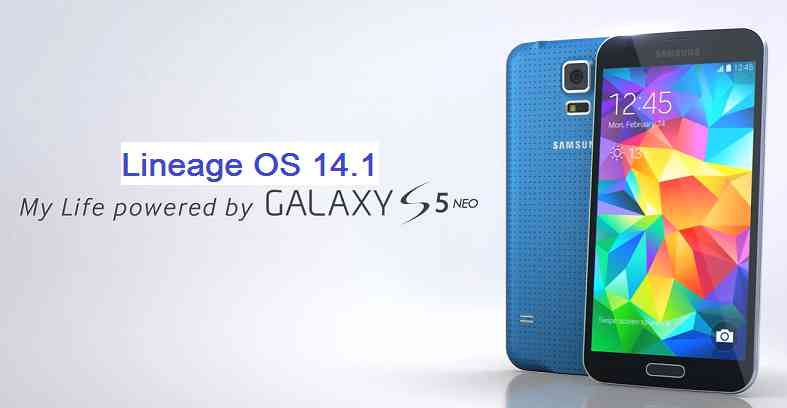
Android Nougat 7.1 ROM, LineageOS 14.1 for Galaxy S5 Neo has now arrived via an UNOFFICIAL build. If you want some more LineageOS ROMs for other devices then stay tuned to the LineageOS 14.1 page. This Galaxy S5 Neo LineageOS 14.1 is brought to you by developer Stricted.
DONATION TO DEVELOPER(S):
If you like the ROM or the TWRP recovery brought to you by these developer(s) then consider donation to them. Believe me it motivates and it matters.
Donate to StrictedDISCLAIMER:
THIS IS AN INITIAL BUILD WHICH MAY HAVE MANY MORE BUGS THAN YOU CAN IMAGINE. HAVE A BACKUP BEFORE FLASHING THIS AND TRY AT YOUR OWN RISK. Installing a custom ROM on a Galaxy S5 Neo (G903F, s5neoltexx) may require the bootloader to be unlocked, which may VOID your warranty and may delete all your data. Before proceeding further you may consider a complete backup. You are the only person making changes to your phone and I cannot be held responsible for the mistakes done by YOU.Status of LineageOS 14.1 for Galaxy S5 Neo (G903F, s5neoltexx) Nougat 7.1 ROM:
WHAT’S WORKING:
– Wifi
– NFC
– Bluetooth
– Camera
– Video Playback
– Audio
– Sensors
– GPSKNOWN ISSUES:
As pointed out by penguin:
– No audio when calling over Bluetooth
– Sending SMS results in “not send error” but sms does goes out.
– USB sometimes dies. Only a reboot re-activates USB. Even charging is not happening. This is caused when connecting specific USB devices that trigger an event to launch an app.
– Unable to open camera from time to time. Only solution is to reboot.
REQUIRED LINKS AND FILES FOR LineageOS 14.1 for Galaxy S5 Neo NOUGAT 7.1 BASED CUSTOM ROM:
- Latest available stock FW and baseband
- Recovery for S5 Neo (by Stricted)
– Here is how to: update TWRP on Galaxy S5 Neo (This guide is only for .tar or .tar.md5 TWRP file)
– To flash .img file you can follow this TWRP update guide using fastboot or you can use Flashify to update the .img TWRP. [YOUR DEVICE MIGHT NEED TO BE BOOTLOADER UNLOCKED IF YOU ARE FOLLOWING THIS] - Galaxy S5 Neo LineageOS 14.1 (by Stricted) ROM download link [UNOFFICIAL]
- GApps for Lineage 14.1 for Galaxy S5 Neo LineageOS 14.1 Nougat 7.1 ROM
Root binary is NOT inbuilt in LineageOS 14.1, so you may need a separate SuperSu package or LineageOS su binary to install to gain ROOT access. Here is LineageOS Rooting guide
If there is no in-built ROOT or it does not work for some reason then you can try SuperSU root guide to gain ROOT access.HOW TO INSTALL/DOWNLOAD/FLASH/UPDATE Galaxy S5 Neo LineageOS 14.1 NOUGAT CUSTOM ROM:
Follow this if you are flashing LineageOS 14.1 for Galaxy S5 Neo (G903F, s5neoltexx) for the first time, or coming from another ROM:
Points to NOTE:
– Try to avoid restoring apps backup using Titanium Backup. It may break things up.
– Don’t restore system data using Titanium Backup! It will definitely break the current installation.
– It is also discouraged to Restoring Apps + Data using Titanium Backup.- Download and Copy the GApps and LineageOS 14.1 for Galaxy S5 Neo ROM ZIP to your phone.
- Boot into Recovery. Make sure to have a Custom recovery like CWM or TWRP or any other custom recovery. If not then follow the Recovery Installation Guide for Samsung phones to flash a custom recovery on the Galaxy S5 Neo (G903F, s5neoltexx). (it’s a generic guide which will work for TWRP as well as CWM recovery or any other recovery)
- Wipe data factory reset, Cache partition, Dalvik Cache and Format the System partition.
– Here is a guide explaining how to wipe data.This will delete all your data on your phone. You may consider complete backup of your phone data or take a NANDROID backup of the current ROM
– backup all data
– NANDROID backup - First flash the Galaxy S5 Neo LineageOS 14.1 ROM ZIP from device. Then flash the GApps zip from your device memory.
– Here is a post explains LineageOS update. - DO NOT REBOOT yet. Then flash the LineageOS 14.1 GApps package.
– Here is a post explaining how to update LineageOS GApps. - Reboot and Enjoy the Nougat 7.1 LineageOS 14.1 ROM for Galaxy S5 Neo (G903F, s5neoltexx).
Upgrading from earlier version of Galaxy S5 Neo LineageOS 14.1 (G903F, s5neoltexx):
- Copy the latest LineageOS 14.1 for Galaxy S5 Neo ROM ZIP file to your phone.
- Boot into Recovery.
- Flash the latest LineageOS ROM ZIP from your phone.
– Here is a post explaining how to install LineageOS. - Then flash the LineageOS 14.1 GApps package.
– Here is a post explaining how to flash GApps. - Reboot and Enjoy
Complete the initial setup and enjoy Android Nougat 7.1 with LineageOS 14.1 for Galaxy S5 Neo (G903F, s5neoltexx). After the installation of Galaxy S5 Neo LineageOS 14.1 ROM (G903F, s5neoltexx) you may want to enable ROOT access on your phone and here is how you can do that:
How to Enable ROOT on LineageOS 14.1.Stay tuned or Subscribe to the Galaxy S5 Neo (G903F, s5neoltexx) forum For other Android Nougat ROMs, LineageOS 14.1 ROMs, other ROMs and all other device specific topics.If you have any concerns or found any BUGS on this ROM then here is the development link to Stricted’s thread.
Android Oreo 8.0 ROM, Galaxy S4 Active LineageOS 15 has now arrived via an UNOFFICIAL build. This LineageOS 15 for Galaxy S4 Active (jactivelte, i9295) is brought to you by developer tsvetkov_vlad.
DONATION TO DEVELOPER:
If you like this ROM then do consider a contribution to tsvetkov_vlad for his efforts:
Donate to tsvetkov_vladIf you want the OFFICIAL LineageOS update or some more Android Oreo ROMs then stay tuned to the LineageOS 15 ROMs page or the AOSP Android Oreo devices list page.
DISCLAIMER:
THIS IS A BETA ROM AND MAY HAVE MANY BUGS. HAVE A BACKUP BEFORE FLASHING THIS LINEAGEOS ROM AND TRY AT YOUR OWN RISK. Installing a custom ROM on a Galaxy S4 Active (jactivelte) requires the bootloader to be unlocked on the Galaxy S4 Active (jactivelte) phone, which may VOID your warranty and may delete all your data. Before proceeding further you may consider backup all data on the phone. You are the only person doing changes to your phone and I cannot be held responsible for the mistakes done by you.Content structure:
Status of Galaxy S4 Active LineageOS 15 Oreo Custom ROM:
WHAT’S WORKING:
– WIFI
– Bluetooth
– RIL(2G,3G,SMS,Incoming calls)
– LED
– Sensors
– Audio Playback
– GPS
– IR BlasterKNOWN ISSUES:
– Camera
– Home button(wake up screen)
– NFC
– Video Playback
– VoLTE (not tested)
REQUIRED LINKS AND FILES FOR Galaxy S4 Active LINEAGEOS 15 OREO CUSTOM ROM:
- TWRP recovery link for Galaxy S4 Active (jactivelte, i9295) [Use This TWRP ONLY]
– Here is theTWRP update guide for the Galaxy S4 Active (jactivelte).
- ROM Download link of LineageOS 15 for Galaxy S4 Active
- LineageOS 15 GApps download link for Galaxy S4 Active LineageOS 15 Oreo 8.0 ROM (Download the stock ARM64 GApps)
Root binary is NOT inbuilt in LineageOS 15, so you may need a separate SuperSu package or LineageOS su binary to install to gain ROOT access. Here is LineageOS Rooting guide
If there is no in-built ROOT or it does not work for some reason then you can try SuperSU rooting guide to enable ROOT access.HOW TO INSTALL/DOWNLOAD/FLASH/UPDATE LineageOS 15 FOR Galaxy S4 Active OREO CUSTOM ROM:
Follow this if you are flashing LineageOS 15 for Galaxy S4 Active for the first time, or coming from another ROM:
Points to NOTE:
– Try to avoid restoring apps backup using Titanium Backup. It may break things up.
– Don’t restore system data using Titanium Backup! It will definitely break the current installation.
– It is also discouraged to Restoring Apps + Data using Titanium Backup.- Boot into Recovery. Make sure to have a Custom recovery like CWM or TWRP or any other custom recovery. If not then follow the Custom Recovery Installation Guide for Galaxy S4 Active (it’s a generic guide which will work for TWRP as well as CWM recovery or any other recovery)
- Wipe data factory reset, Cache partition, Dalvik Cache and Format the System partition.
– Here is a guide explaining how to wipe data using TWRP recovery.This will delete all your data on your phone. You may consider complete backup of your phone data or take a NANDROID backup of the current ROM
– How to backup all data on your Android Device
– how to take NANDROID backup using TWRP recovery - Download and Copy the LineageOS 15 GApps and Galaxy S4 Active LineageOS 15 ROM ZIP file to your phone.
- First flash the Galaxy S4 Active LineageOS 15 ROM ZIP from device. Then flash the GApps for LineageOS 15 zip from your device memory.
– Here is a post explaining how to install LineageOS - Then reboot into recovery (don’t skip this) and flash the Gapps for LineageOS 15 package.
– Here is a post explaining how to flash GApps using TWRP recovery. - Reboot and Enjoy the Oreo 8.0 LineageOS 15 ROM for Galaxy S4 Active.
Upgrading from earlier version of LineageOS 15 for Galaxy S4 Active (jactivelte):
- Copy the latest Galaxy S4 Active Lineage 15 ROM ZIP file to your phone.
- Boot into Recovery.
- Flash the latest LinegeOS ROM ZIP from your phone.
– Here is a post explaining how to install LineageOS - Then flash the Lineage 15 Oreo GApps package.
– Here is a post explaining how to flash GApps using TWRP recovery. - Reboot and Enjoy
Complete the initial setup and enjoy Android Oreo 8.0 with LineageOS 15 for Galaxy S4 Active. After the installation of LineageOS 15 for Galaxy S4 Active you may want to enable ROOT access on your phone and here is how you can do that:
How to Enable ROOT on LineageOS 15.Stay tuned or Subscribe to the Galaxy S4 Active LineageOS forum For other Android Oreo, Nougat ROMs, LineageOS 15 ROMs, other ROMs and all other device specific topics.If you have found any BUG or any issues with this ROM, then following is the development thread at XDA created.
Android Oreo 8.1 ROM, LineageOS 15.1 for Galaxy J7 Prime (on7xelte) has now arrived via a development build. This LineageOS 15.1 for Galaxy J7 Prime (on7xelte) is brought to you by developer DarkLord1731.
DONATION TO DEVELOPER:
If you like this ROM then do consider for a small contribution to DarkLord1731 and/or LineageOS project:
– donation to DarkLord1731
– Donate to LineageOS projectIf you want the OFFICIAL LineageOS update or some more Android Oreo ROMs then stay tuned to the LineageOS 15 Oreo ROM page or the AOSP Android Oreo devices list page or the AICP 13 Oreo ROMs list.
DISCLAIMER:
THIS IS A BETA BUILD WHICH MAY HAVE MINOR BUGS. HAVE A BACKUP BEFORE FLASHING THIS LINEAGEOS ROM AND TRY AT YOUR OWN RISK. Installing a custom ROM on a Galaxy J7 Prime (on7xelte) requires the bootloader to be unlocked on the Galaxy J7 Prime (on7xelte) phone, which may VOID your warranty and may delete all your data. Before proceeding further you may consider backup all data on the phone. You are the only person doing changes to your phone and I cannot be held responsible for the mistakes done by you.Content structure:
Status of LineageOS 15.1 for Galaxy J7 Prime Oreo 8.1 Download:
WHAT’S WORKING:
– Almost EverythingKNOWN ISSUES:
– Sometimes screen on delay once after a reboot
REQUIRED LINKS AND FILES FOR LineageOS 15.1 for Galaxy J7 Prime OREO CUSTOM ROM:
- TWRP recovery link for Galaxy J7 Prime (on7xelte)
– Here is the TWRP update guide for the Galaxy J7 Prime (on7xelte).
- LineageOS 15.1 Download link for Galaxy J7 Prime (on7xelte)
- LineageOS 15.1 GApps download link for LineageOS 15.1 for Galaxy J7 Prime Oreo 8.1 ROM
Root binary is NOT inbuilt in LineageOS 15.1, so you may need a separate SuperSu package or LineageOS su binary to install to gain ROOT access. Here is LineageOS Rooting guide
If there is no in-built ROOT or it does not work for some reason then you can try SuperSU rooting guide to enable ROOT access.HOW TO INSTALL/DOWNLOAD/FLASH/UPDATE LineageOS 15.1 FOR Galaxy J7 Prime OREO CUSTOM ROM:
Follow this if you are flashing LineageOS 15.1 for Galaxy J7 Prime for the first time, or coming from another ROM:
Points to NOTE:
– Try to avoid restoring apps backup using Titanium Backup. It may break things up.
– Don’t restore system data using Titanium Backup! It will definitely break the current installation.
– It is also discouraged to Restoring Apps + Data using Titanium Backup.- Boot into Recovery. Make sure to have a Custom recovery like CWM or TWRP or any other custom recovery. If not then follow the Custom Recovery Installation Guide for Galaxy J7 Prime (it’s a generic guide which will work for TWRP as well as CWM recovery or any other recovery)
- Wipe data factory reset, Cache partition, Dalvik Cache and Format the System partition.
– Here is a guide explaining how to wipe data using TWRP recovery.This will delete all your data on your phone. You may consider complete backup of your phone data or take a NANDROID backup of the current ROM
– How to backup all data on your Android Device
– how to take NANDROID backup using TWRP recovery - Download and Copy the LineageOS 15.1 GApps and the Android Oreo based LineageOS 15.1 for Galaxy J7 Prime ROM ZIP file to your phone.
- First flash the LineageOS 15.1 for Galaxy J7 Prime Oreo ROM ZIP from device. Then flash the GApps for LineageOS 15.1 zip from your device memory.
– Here is a post explaining how to install LineageOS - Then reboot into recovery (don’t skip this) and flash the Gapps for LineageOS 15.1 package.
– Here is a post explaining how to flash GApps using TWRP recovery. - Reboot and Enjoy the Oreo 8.1 LineageOS 15.1 ROM for Galaxy J7 Prime.
Upgrading from earlier version of LineageOS 15.1 for Galaxy J7 Prime (on7xelte):
- Copy the latest Galaxy J7 Prime Lineage 15 Oreo ROM ZIP file to your phone.
- Boot into Recovery.
- Flash the latest LinegeOS ROM ZIP from your phone.
– Here is a post explaining how to install LineageOS - Then flash the Lineage 15 Oreo GApps package.
– Here is a post explaining how to flash GApps using TWRP recovery. - Reboot and Enjoy
Complete the initial setup and enjoy Android Oreo 8.1 with LineageOS 15.1 for Galaxy J7 Prime. After the installation of LineageOS 15.1 for Galaxy J7 Prime you may want to enable ROOT access on your phone and here is how you can do that:
How to Enable ROOT on LineageOS 15.1.Stay tuned or Subscribe to the Galaxy J7 Prime LineageOS forum For other Android Oreo, Nougat ROMs, LineageOS 15.1 ROMs, other ROMs and all other device specific topics.For any concerns on this ROM, you can further look for the following thread on xda.
This guide will tell you how to rooting Galaxy ALPHA and how to install a TWRP custom recovery on your Samsung Galaxy ALPHA (SM-G850F). A custom recovery is the world to some beautiful custom ROMs for your device. If you agree with me then you do understand the need of a custom recovery for a device. Samsung Galaxy ALPHA was recently released to market and today we have the TWRP custom recovery for that. With this first custom recovery you will also see some custom ROMs like Cyanogenmod 12, Paranoid Android and more for Samsung Galaxy ALPHA in near future.
After installing TWRP recovery you can install many android mods such as GCam APK, enable navigation gesture, enable face unlock, viper4android etc. and many more.
DISCLAIMER:
Installing custom recovery on your device may VOID your warranty and may delete all your data. Before proceeding further you may consider backup your all data. Understand the fact that you are the only person responsible for everything that you do with you device. If you blame me for a disaster that happened to your device then I will simply laugh at you.
[Galaxy Alpha TWRP Custom recovery and Rooting guide]
Before going into details make sure that you have the following things in hand to start with the recovery installation guide.Things required for Rooting Galaxy ALPHA and installing TWRP custom recovery guide:
- Download and install KIES that contains driver for Galaxy ALPHA
- A Linux/Windows PC or a MAC installed with Fastboot and adb binaries:
– 15 Seconds ADB Installer for Windows
– Minimal ADB and Fastboot for Windows
ADB Fastboot Installation guide for Linux or MAC - Latest SuperSU by chainfire
- TWRP Recovery Download link for Galaxy ALPHA
- Download Samsung ODIN flashing application
- Enough time with a smart and cool brain
You may follow the below link to backup all the data on your android device:
Step by step guide to take full backup of your phone dataSTEP by STEP recovery installation guide for Galaxy ALPHA:
If you already have ROOT then follow this process to flash the recovery easily.
Download the latest recovery file in img format from the above link and copy it in the sdcard.
Access to your phone’s console by using adb or terminal emulator app and type the below commands:$ su
# dd if=/sdcard/recoveryfilename.img of=/dev/block/mmcblk0p10
That’s all.
And make sure that you enter the command right.If you don’t have ROOT on your phone then follow this below guide.
STEP 1:Put your phone into download mode.
Press and hold these three buttons until you see a WARNING SCREEN! to enter into the download mode:
Volume DOWN keys + Power key + Home keyWhen you see the WARNING SCREEN press the volume UP key to continue into the recovery mode.
STEP 2:Open the ODIN application on your PC.
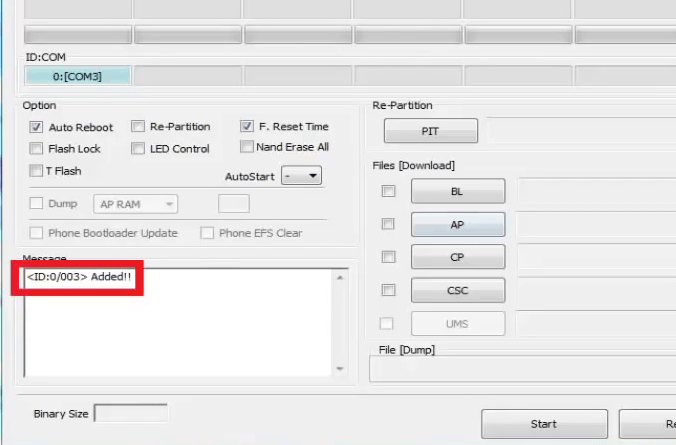
Connect your phone(while it is still in the download mode) to the PC using a USB cable.
ODIN will show an Added! message on the message box.
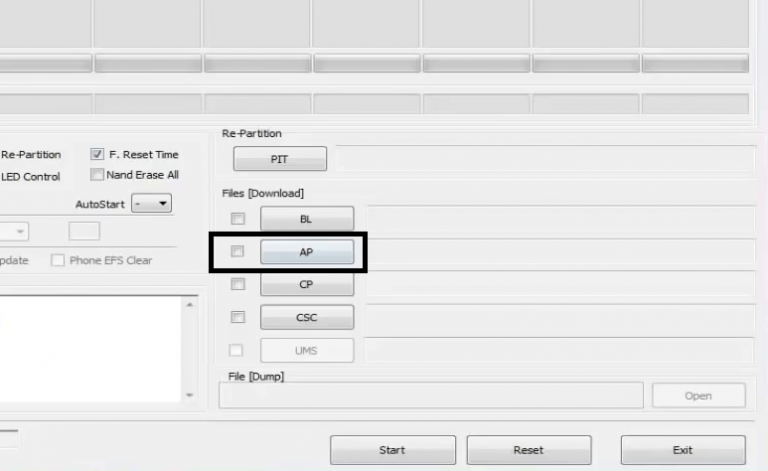
[Device added on the ODIN screen]STEP 3:Click on the AP button on the ODIN application and select the CWM recovery file.

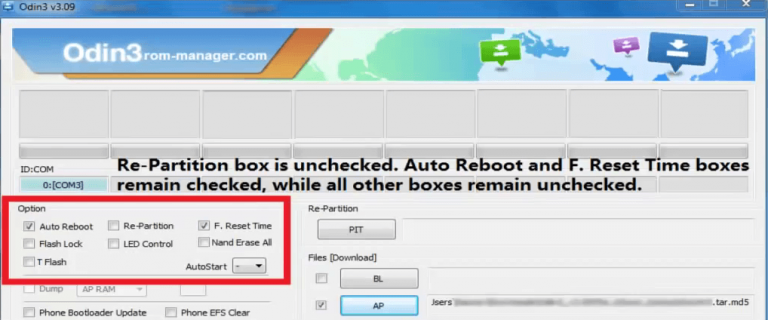
[Click on the AP button and select the recovery file]STEP 4:Select the appropriate options before flashing the recovery image.
only the Auto Reboot and F. Reset Time
Make sure all other boxes are un-checked.
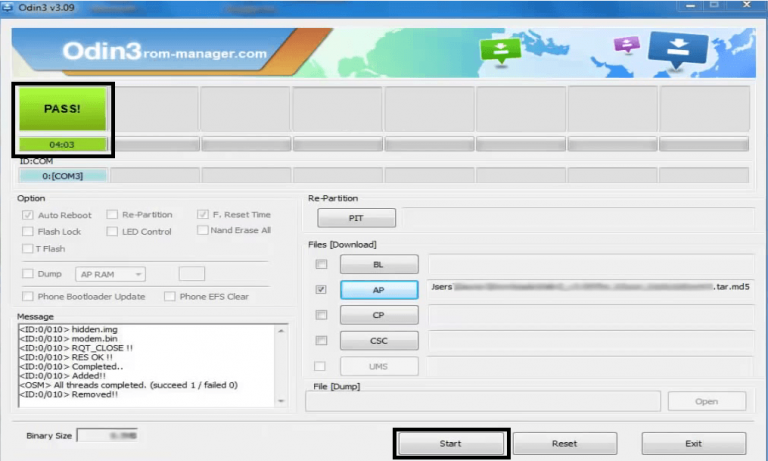
[Select the options]STEP 5:Select the start button, which will start the flashing process.
When you get the PASS message, then your phone will reboot automatically.
[Click on Start and wait till it completes]You may disconnect your phone and proceed for the next process from here on.
Rooting Galaxy ALPHA using the custom recovery:
NOTE:
Rooting guide will only work after the custom recovery installation.
If you will SKIP the custom recovery installation process and perform only these steps then rooting will not be done.STEP 1:Copy the Flashable ROOTing zip file that you have downloaded to your SD card.
STEP 2:Press and hold these three buttons until you see a WARNING SCREEN! to enter into the recovery mode:
Volume UP keys + Power key + Home keyWhen you see the WARNING SCREEN press the volume UP key to continue into the recovery mode.
STEP 3:Select the Install option in the TWRP recovery screen and Select the BETA-SuperSU-v2.xx.zip zip file where you have kept in the SD card.
Wait for the flashing to be done and then reboot your phone.After successfully completing all the above mentioned steps your device will be rooted. That’s all… have fun.
Stay tuned or Subscribe to the Galaxy Alpha forum For upcoming Android Nougat ROMs, CyanogenMod Custom ROMs, other ROMs and all other device specific topics.- TWRP download link for Galaxy NOTE 2 (n7100)