
Samsung Galaxy M31 GCam Port Download | Latest Google Camera APK
January 16, 2024Size
Varies with versionVersion
9.1.098Requirements
Android
Description
Galaxy M31 was released recently and now we have a working port of Google Camera for Galaxy M31 available to download. This is a GCam APK port which is brought to you by Arnova8G2, IDan and Zoran.
Android compatibility and working features
There are multiple versions and build of GCam available for the Galaxy M31 which may have the following features – HDR+, Portrait mode etc.
Where to Download GCam for Galaxy M31?
GCam 7.3 Download: https://cyanogenmods.org/downloads/arnova8g2-gcam-apk-7-3-018-5beta10/
GCam 6.1 Download 1: https://cyanogenmods.org/downloads/google-camera-apk-6-1-021-advanced-v1-5-190418-1850/ (Portrait and Night Sight does not work)
GCam 6.1 Download 2: https://cyanogenmods.org/downloads/zoran-gcam-apk-6-1-v3-8/
GCam 5.1 Download: https://cyanogenmods.org/downloads/idan-google-camera-5-1-018-mod8-3b-v4-7/
Status of Galaxy M31 Google Camera APK –
– Unknown
– Front Camera?
– Slow motion?
– Aux cameras (wide angle and macro lens)
How to Install Google Camera on Galaxy M31?
- Download one of the Google Camera APK file from the above download link
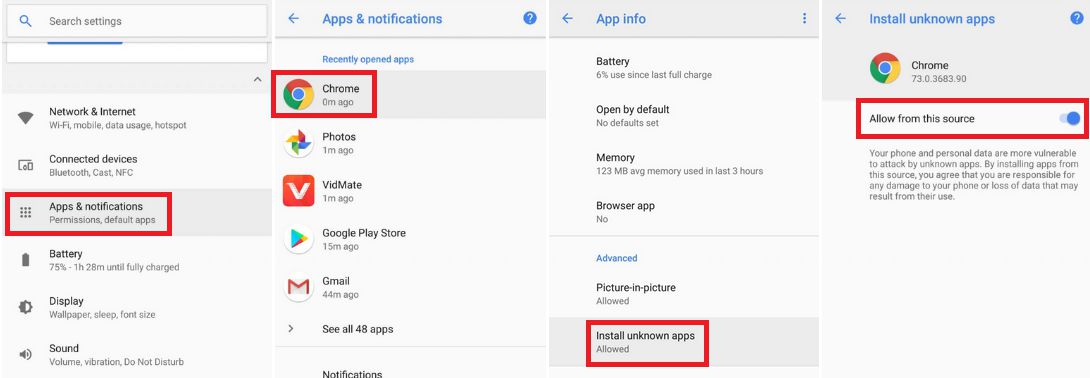
- To install apps from a third party app other than Play Store you need to enable app install from Unknown Sources on your Android device.For Android Pie version, enable Install Unknown Apps from the app from which you are going to install the Google Camera APK.
For example: if you have downloaded the Google Camera apk file on Google chrome or firefox browser on your phone.
Or you have downloaded and copied the apk file to the file browser and you want to install it from there.Go to Settings > Apps & notifications > Open the app (Chrome, Firefox or file manager app etc) > Install unknown apps and enable Allow from this source
See the below screenshots that enables to install unknown apps on Android Pie for Chrome app (you need to enable on the app from where you want to install the apk):
- Once enabled, click on the app to install.
That’s all for the Galaxy M31’s Google camera. Stay tuned to this article for more updates on getting a stable or other latest updates of GCam for Galaxy M31.
New Google Camera versions are keep on coming and so does new features, hence there could be many versions of these ported apps for Galaxy M31. Below forum will have all GCam apk updates for the Galaxy M31.
Stay tuned to the Galaxy M31 page for other Google Camera, Custom ROMs and all other device specific topics.
Download links
How to Install Samsung Galaxy M31 GCam Port Download | Latest Google Camera APK APK?
Make sure that there should not be any prior version of Samsung Galaxy M31 GCam Port Download | Latest Google Camera APK apk already installed on your phone. If so, uninstall that before installing this one.
- First of all, download the Samsung Galaxy M31 GCam Port Download | Latest Google Camera APK APK from the above download link
- Install the Split APK installer app and then install the downloaded mod APK using that. (or) follow the below instructions
- Enable app install from Unknown Sources to install apps from a third-party app other than Google Play Store.
To do that go to Settings and search the word unknown
- For Android Nougat or lower version click on Unknown sources and enable that setting.
- For Android Oreo or later, clicking on Install unknown apps which will take you to a list of apps.
Select the actual app through which you want to install the apk of Samsung Galaxy M31 GCam Port Download | Latest Google Camera APK.Or you can do it other way: Let's say, you have downloaded the APK file of Samsung Galaxy M31 GCam Port Download | Latest Google Camera APK on Google chrome or firefox browser on your phone.Go to Settings > Apps & notifications or go to Settings > search for unknown > Open the app (Chrome, Firefox or file manager app etc) > Install unknown apps and enable Allow from this source - Once enabled, tap on the hack (or) mod apk file to install
 Vivo Y21 GCam port
 Vivo Y20 GCam port
 Realme 7 GCam port
 GCam APK port
 Poco M3 GCam Port
 Oppo GCam port
 Vivo GCam port
 Redmi Note 9 Pro GCam port
Hello!
Download link is broken.
Hi John. Thanks for reporting.
I have added all the download links. Can you please take a look at that and tell me if it is still broken?
Link is again broken
I love gcam
Hello, I updated my phone to one ui 2.5 and I am unable to use Google cam. Please help