
Scikit-Learn is a free machine learning library for Python, it is best for working with complex data. It is designed to interoperate with NumPy and SciPy libraries.
Scikit-Learn provides a higher-level interface for machine learning and features various classification, regression, and clustering algorithms. It can be combined with the Python web framework to build the frontend and expose your application to the web.
In this article, I will discuss how to install the Scikit-Learn library on a Ubuntu system.
Prerequisites
To follow this guide you should have the following –
- Access to a user account that has superuser privileges
- Python 3 should be installed on your Ubuntu system
How to install Scikit-Learn in Ubuntu
We will discuss how to install Scikit-Learn by creating Python virtual environment or directly on your Ubuntu system.
Installing Python, Python pip, and Python venv packages
Before you install Scikit-Learn, first you need to install Python, Python pip, and Python venv packages on your Ubuntu system.
Use the following command to install the latest version of Python available in the Ubuntu repository –
sudo apt updatesudo apt install python3 -yNext, use the following command to install Python pip –
sudo apt install python3-pip -yYou also need to install the python-venv package to create Python virtual environment.
The advantage of using virtual environments is that they provide isolation which means no environment interacts with another each of them works as an independent unit and its unusual changes do not damage other projects.
Use the following command to install python-venv package –
sudo apt install python3-venv -yInstalling Scikit-Learn in Python virtual environment on Ubuntu
First, create a project directory let’s say it is ml-project, make the directory with a meaningful name.
mkdir ml-projectMove to the created directory by using –
cd ml-projectNext, use the given command to create a python virtual environment –
python3 -m venv ml-devActivate the virtual environment by using –
source ml-dev/bin/activateNow your prompt will change to a virtual environment as you can see in the image below.

Use the given command to install Scikit-Learn –
pip install -U scikit-learnYou can verify the installation by using the given command –
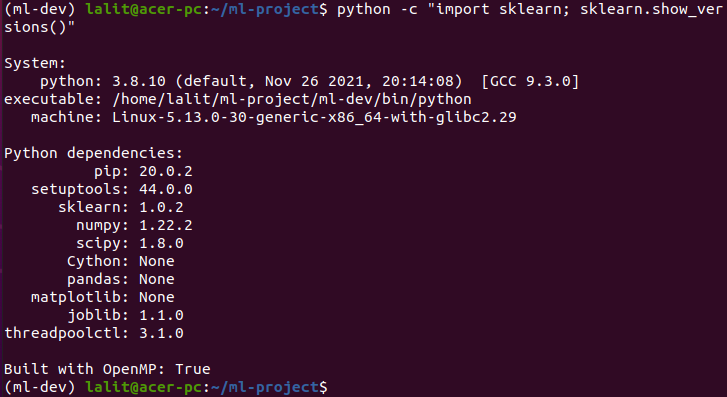
python -c "import sklearn; sklearn.show_versions()"If Scikit-Learn is successfully installed then it will display the given output in your terminal.
If you want you can deactivate the virtual environment by using the given command –
deactivateInstalling Scikit-Learn in a Ubuntu system
If you want to install it on your Ubuntu system, not on the virtual environment that you have created then use the following command in your terminal –
pip3 install -U scikit-learnOnce it gets installed, you can verify the installation by using the given command –
python3 -c "import sklearn; sklearn.show_versions()"If it displays no error that means ScikitLearn has been set up successfully on your system.
Now if you have a query then write us in the comments below
Thanks