- Search Results
Forum: Google Nexus Generic Forum
Google Nexus Generic topics will be covered on this forum. For example: Bootloader unlock guide is same across the Nexus devices, which is kept under this forum and similar topics which are generic across all Nexus devices.Forum: Nexus 7 – Flo
Google Nexus 7 (Codename: flo) Lineage OS, CyanogenMod ROMs, Android Nougat ROMs, Resurrection Remix ROMs, and many other ROMs, Rooting guide, Recovery guide, Troubleshooting, device specific discussion and many more.This is a forum for Galaxy Nexus GSM (codename: maguro), Galaxy Nexus Sprint (codename: toroplus), Galaxy Nexus Verizon (codename: toro) Lineage OS, CyanogenMod ROMs, Galaxy Nexus GSM, Sprint, Verizon Android Nougat ROMs, Official and Unofficial ROMs, many other ROMs, Themes, Rooting and Recovery guide, troubleshooting and many more.Forum: Google Camera Forum
Google Camera is a camera app available exclusively on Google Pixel or older Nexus lineup phones. There many developers who have already ported this Google Camera APK for many other Android phones. In this forum you will find all Google Camera downloads, new updates, changelogs, etc.I have recently rooted my Google Nexus 7 (2012) and flashed it with Lineage OS / Android Nougat.
All is fine except the thumbnails of my video files have a green, mauve (or both) tint.
This applies to 99% of .mp4 files, whilst .wmv, .flv and one odd .mp4 files have no thumbnails-
just the standard camera icon.
This is happening irrespective of what file viewer I use. (eg the stock “Files” app or Astro)
Thumbnails of jpeg pictures are ok and unaffected.
Before rooting, there was no problem in Android 5.1.1.
So the problem could either be associated Nougat, or the Lineage OS.
I have tried the usual emptying of caches, and deleting thumbnail folders to no avail.
Internet trawl hasn’t helped.
Can anyone here please.I wiped data of my Nexus 5 using TWRP manager using Advanced Wipe option. However, after rebooting the device is hanged at the initial “Google” screen.
What should be done? What step did I miss out?This tablet, along with the Huaweii M3 8, seems to be a very strong contender for all us aging Nexus 7 owners to upgrade to, but it has a massive problem with SD card corruption. Jury is out on whether this is a hardware or software issue, but a quick trial build of LineageOS could signal pretty quickly if it’s a project and tablet worth considering, or both are DOA.
Few working ports of GCam for Realme X built by marlin-ku and BSG are now available.
This is just a port of Google Camera and not the actual stock Google Camera that is available on Google Pixel phones. This build of Google Camera APK (GCam APK) for Realme X is the latest one and has all the features working.
Google Camera is known for it’s HDR+, Portrait mode, Night sight mode, Google lens integration etc. which are exclusive to the Google’s Pixel camera app. No other camera app has a match to these features. Google Camera is only available for Google Pixel devices but developers have ported the same to other devices as well and that is why we have the GCam APK available for Realme X phone.
So let’s check out the working features of this build, how to download and install the GCam apk on Realme X in the below sections!

About this Google Camera for Realme X
This GCam APK for Realme X is a port of Google Camera latest version 6.2.030 where Time Lapse feature was introduced.
Following are the changelog or the newest features ported on this Google Camera APK:- Android 9+
- Add HDR+ Auto from pixel 3
- Add Exposure Compensation
- Add Custom HDR+ denoise
- Add Color Capture Support
- Fix Multi-Lens mode
- Fix PatchLoader by @KoopahTManiac (on XDA)
- Fix and stability for ZenFone6 and OP7/7Pro
- This version works with Multi-Lens ( Bug with Telephoto lens for OP7/7Pro )
[su_note note_color=”#D7E3F4″ text_color=”#728095″ radius=”3″ class=”” id=””]
TROUBLESHOOTING:
If photos are black and white on the first opening, restart the app and try again.
[/su_note][su_note note_color=”#D8F1C6″ text_color=”#769958″ radius=”3″ class=”” id=””]
Download Google Camera for Realme X:
Below are the compatible versions of GCam port available for the phone:
GCam 8.1 download
GCam 6.2 Download
[/su_note]How to Install the Google Camera APK on Realme X:
- Download the GCam apk from the above download link.
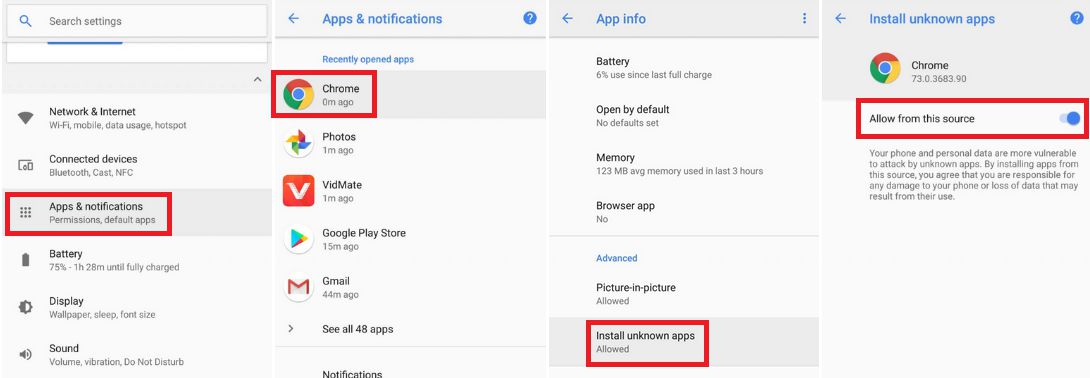
- To install apps from a third party app other than Play Store you need to enable app install from Unknown Sources on your Android device.For Android Oreo or Pie version, enable Install Unknown Apps from the app from which you are going to install the Google Camera APK.
For example: if you have downloaded the Google Camera apk file on Google chrome or firefox browser on your phone.
Or you have downloaded and copied the apk file to the file browser and you want to install it from there.Go to Settings > Apps & notifications > Open the app (Chrome, Firefox or file manager app etc) > Install unknown apps and enable Allow from this sourceSee the below screenshots that enables to install unknown apps on Oreo for Chrome app (you need to enable on the app from where you want to install the apk):

- Once enabled, click on the downloaded app to install.
- Once installed you can clear the app data and open the app and enjoy the feature packed Google Camera APK on Realme X.
Required Manual Settings for Google Camera APK 6.2.030 on Realme X:
Google Camera APK is never available for phones other than Google Pixel series. With that fact, this is just a port of the actual Google Camera app built by Arnova8G2.
As this is not a camera app made specifically for Realme X, hence, it is possible that some of the Google camera features may not work as intended.
Also, these ported GCam apps are very much flexible in terms of settings which you can tune to get the most out of it! To run this GCam APK buttery smooth on the Realme X, you can use the following settings:
- Turn on the Advanced Mode.
[su_note note_color=”#D7E3F4″ text_color=”#728095″ radius=”3″ class=”” id=””]Go to More > Settings > Scroll Down and Choose About and Turn on the Enable Advance Mode.[/su_note] - Then go to HDR+ Settings and choose the Back Camera > Select Pixel 3 XL, and Go to Front Camera > Select Nexus 6P
These are some of the basic settings that need to be applied. If you want to experiment you can always change some default settings to see what GCam APK settings suits best for your Realme X phone.
New features are keep on coming on the Google Camera app and hence there could be many versions of these ported apps for Realme X. Below forum will have all GCam apk updates for the Realme X.
Visit the below link to get Google Camera download for other versions and for other devices as well.
Stay tuned or Subscribe to the Realme X for other Google Camera APK, Custom ROMs and all other device specific topics.