
A Unix shell is a program that interprets the command or script and acts as an intermediary between the user and kernel of the system. Bash, zsh, csh, and fish are some examples of Unix shells.
Like Bash, Ksh (Korn Shell) is a Unix shell and scripting language which is upward compatible with sh. It was developed by David Korn in Bell Labs in the early 1980s.
Bash is the default shell on most Linux distributions but if you want you can install other shells also on your system.
Today in this article I will discuss how to install Ksh in Fedora Linux.
Ksh vs Bash
The major difference between ksh and bash are given below-
- Ksh has associative arrays and bash doesn’t also it has built-in floating-point operations.
- Bash handles getting exit codes from pipes in a cleaner way.
- Ksh has a
printcommand which is way better than theechocommand. - Ksh has the
rhistory command that allows quickly to re-run older commands. - Bash is much easier to set a prompt that displays the current directory.
- Ksh has three command-line editing styles based on vi, emac, and gosling emac.
How to install Ksh in Fedora
Ksh is available in the default Fedora repository you can directly install it by using the dnf command in your terminal.
First, open your terminal and run the given command to update the Fedora package repository –
sudo dnf updateNext, use the given command to install Ksh on Fedora –
sudo dnf install kshPress y and then enter if it asks for your confirmation.
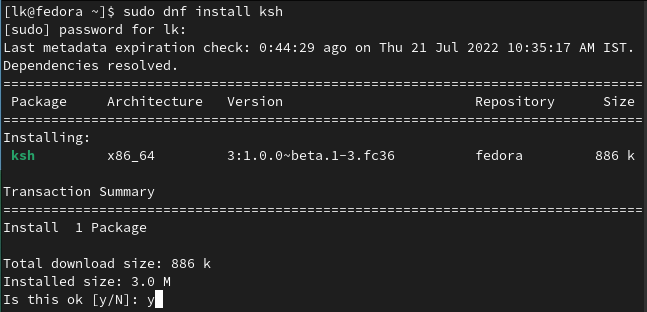
Once the installation is completed you will have multiple Unix shells installed on your system.
Using Ksh on Fedora
To start using ksh you just type ksh and then hit enter, your current shell will be changed to Ksh-
kshNow here you can run commands or execute ksh scripts.

To get back to bash execute –
exitMake Ksh your default Unix shell
If you want to make Ksh your default shell then first you will have to locate it.
Use the given command to find the path of Ksh on your system –
whereis ksh
Now use the given command to make Ksh your default shell
sudo chsh -s /usr/bin/kshThis will change the default shell for the root user.

To make ksh default for a particular user on a system, use –
sudo chsh -s /usr/bin/ksh user_nameTo make bash your default shell again by using –
chsh -s /bin/bashHow to remove Ksh from Fedora
For any reason if you want to remove Ksh from your system then run the given command in your terminal –
sudo dnf remove kshConclusion
So you have successfully set up Ksh on your Fedora system. Now if you have a query or feedback then write us in the comments below.