
Lisp is the second oldest programming language after Fortran, which was developed around 1960 by John McCarthy at MIT. It has various dialects some well-known ones are Common Lisp, Clojure, Scheme, Racket, etc. It has a fully parenthesized prefix notation.
Today in this article I will discuss how to install SBCL (Steel Bank Common Lisp) in Ubuntu. SBCL is a high-performance, free implementation of Common Lisp with Unicode and threading support.
Prerequisites
To follow this guide you should have the following –
- A system running Ubuntu Linux
- Access to a user account with sudo privileges
Installing SBCL
SBCL package is available in the default Ubuntu repository you can directly install it by using the apt command. But before you install a package make sure the apt package repository is updated –
sudo apt updateNext use the following command to install SBCL –
sudo apt install sbclPress y and then enter if it asks for your confirmation.
You can verify the installation by using the given command –
sbcl --version
Running the Hello World program in SBCL
Once the installation is successful, use a text editor and create a file with the .lisp extension.
nano hello.listHere copy and paste the given code.
(write-line "Hello World!")As you can see in the image below.

Save this code by pressing Ctrl+s and exit from the editor by using Ctrl+x.
Now to execute this code by using the given command in your terminal –
sbcl --script hello.lispThis will display output as given in the image below.

Using SBCL in interactive mode
To use Steel Bank Common Lisp in interactive mode simply type the given command –
sbclNow you can start writing your code, you can see an example in the given image.
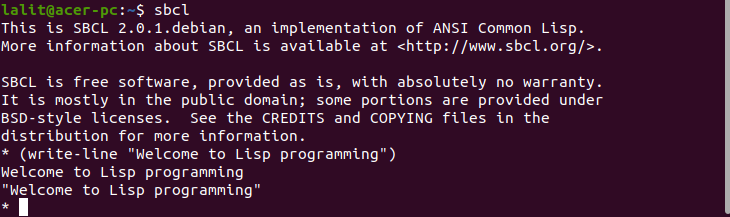
You can exit from the SBCL interpreter by executing the given command –
(exit)Now you can find more information on how to use Common Lisp by following its official documentation.
Conclusion
I hope you have successfully installed Steel Bank Common Lisp on your system. Now for any query or suggestion write to us in the comments below.